Kassa DZ POS option · Online shop

Your online shop, connected to your till.

A storefront in your name that customers open from Facebook, Instagram or WhatsApp. Prices, photos and availability come from the till. Orders reach the counter encrypted: you call, you confirm, you ship with your courier.

NewVersion 1.13: site manager, customer accounts, Messenger, Instagram and TikTok
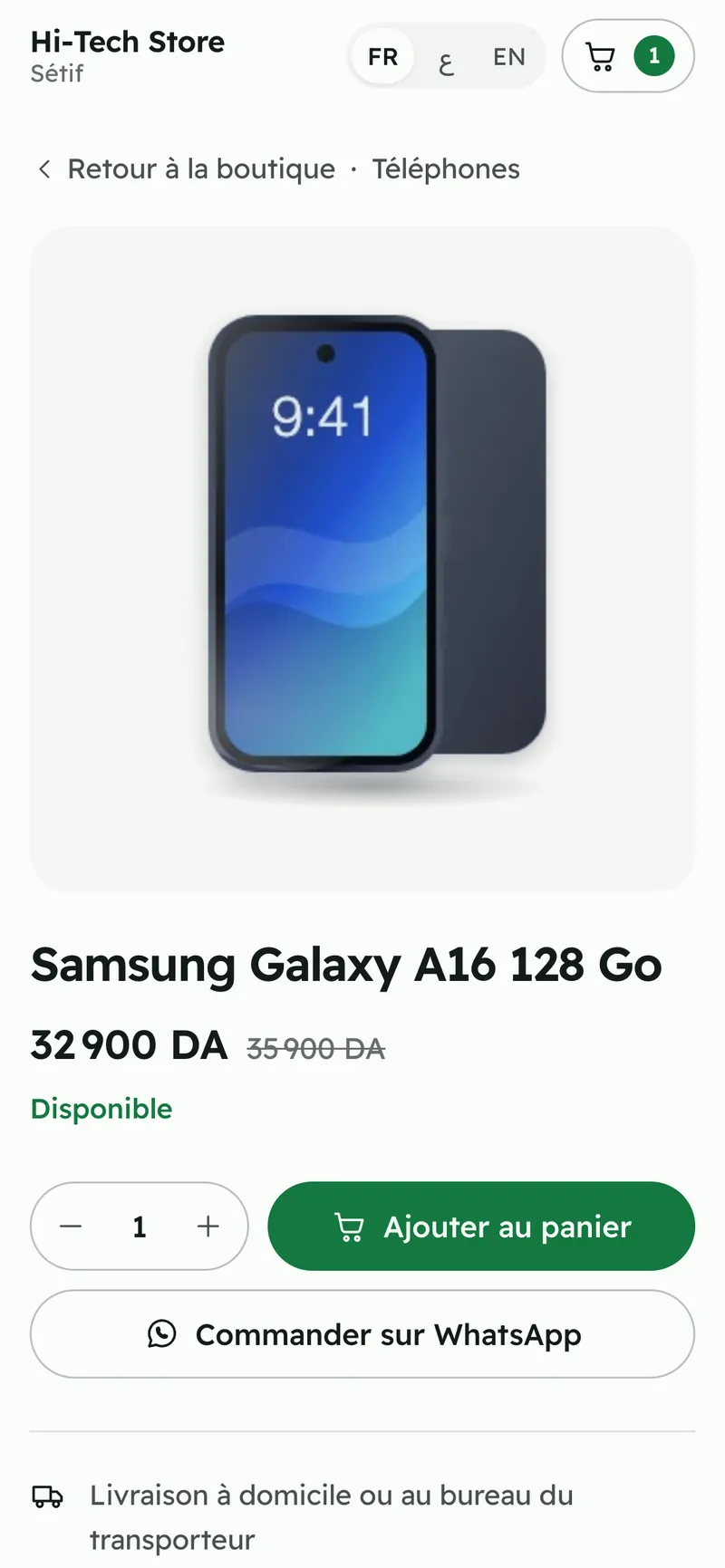
Storefront product page: photo, struck-through price, availability, add to cart and order on WhatsApp
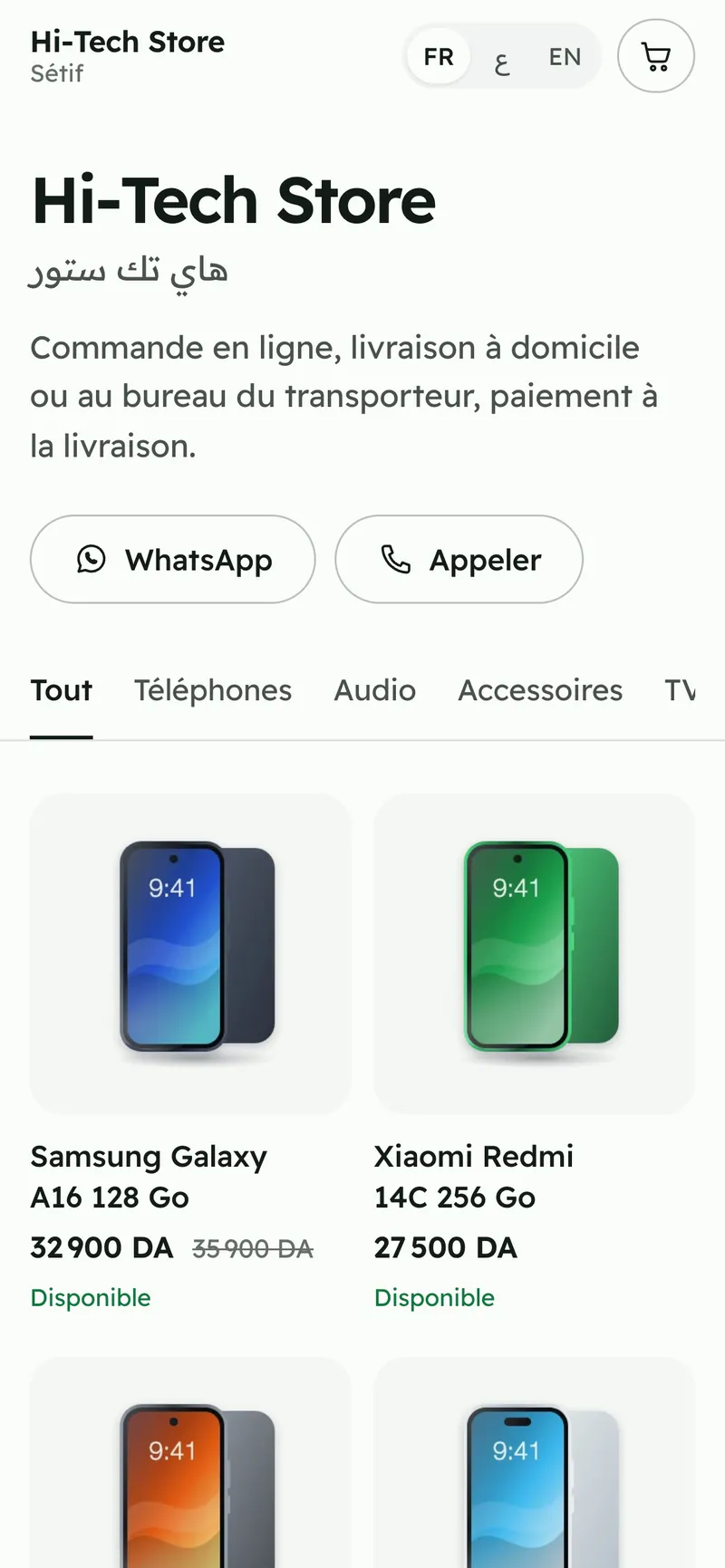
Online storefront of a demo shop on a phone: categories, photos, prices and availability
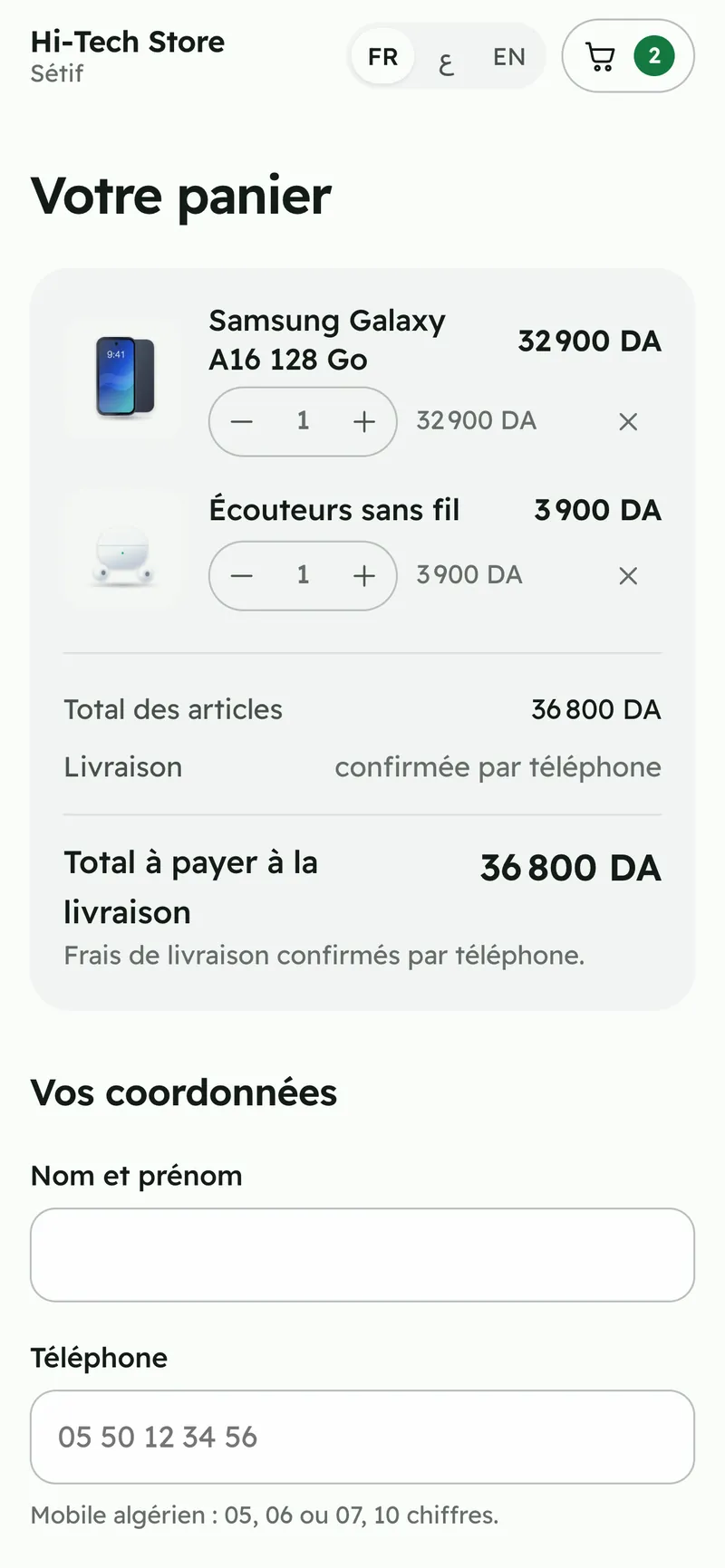
Storefront cart: items, total payable on delivery and customer details
  • An option of your licence
  • Storefront in French, Arabic and English
  • Cash on delivery
  • 69 wilayas, depending on your couriers

Storefront screenshots with a demo shop: products and prices are fictitious.

New · version 1.13

Online shop v3, run from the till.

A real web shop in your name, with no web agency: look, home page, promotions, menus, pages, delivery and customer accounts are all set in Kassa DZ POS. Your customers order on the site, on WhatsApp, Messenger, Instagram or TikTok.

Requires Kassa DZ POS 1.13 on the main till, with the Online shop option on your licence.

The site manager, inside the till.

Settings › Online shop › Site manager: nine tabs for the whole site. You prepare, check the private preview, then publish. Nothing changes online before “Publish design”.

  • Look, home page, slider, promotions and flash sale, menus
  • Pages and SEO: about, delivery, returns, terms, contact, questions
  • Delivery, sales and customer accounts, domain
  • Promotions (struck-through prices) apply right away
Two more themes, and a complete home page.

Volt for electronics, Atelier for fashion, beauty and gifts, on top of the five existing themes. The home page follows the order you choose: slider, trust strip, departments, flash sale, promotions, brands, reviews, contact.

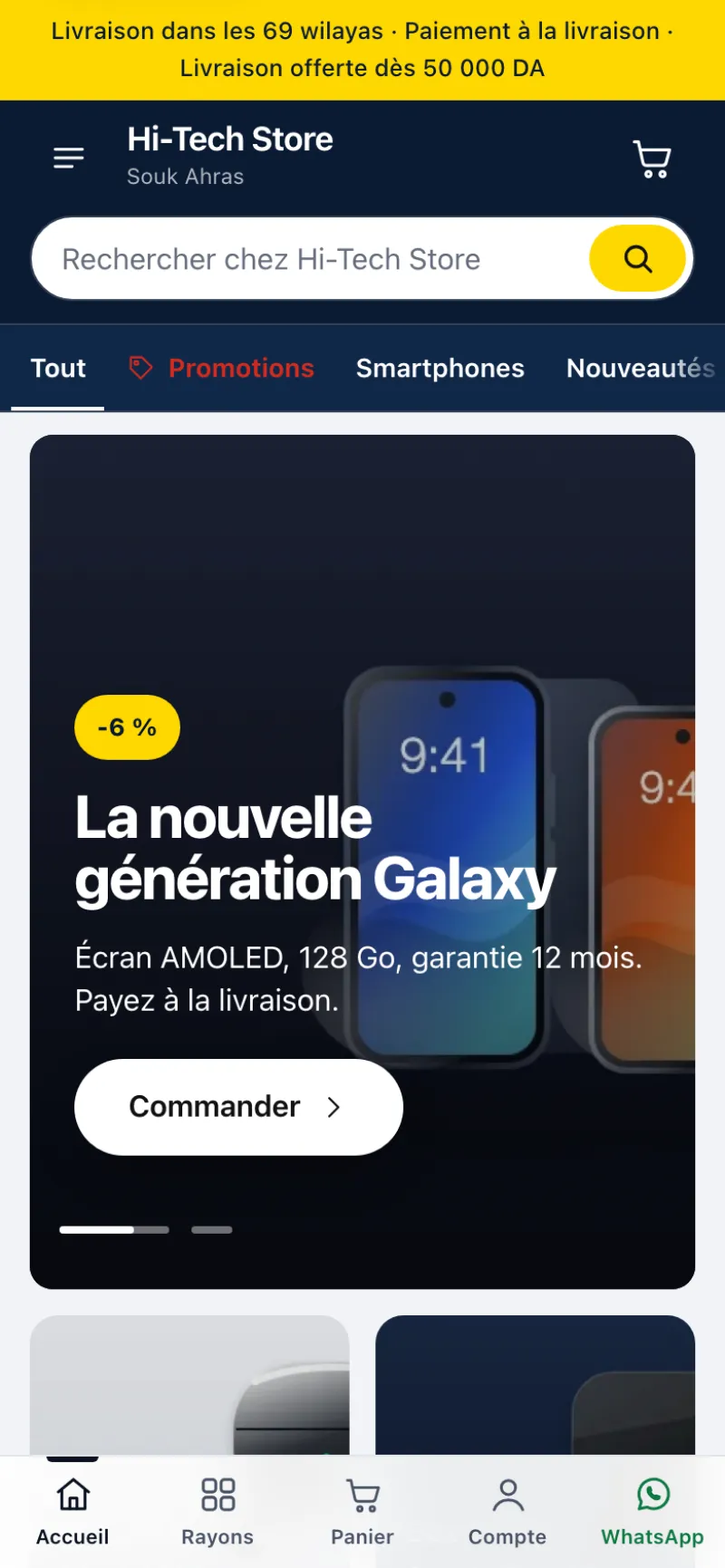
  • Volt: midnight blue header, electric yellow, departments up front
  • Atelier: white, black, powder pink, tall photos
  • Department menu, side menu and bottom bar on phones
  • Quick view of an item, full-screen gallery
Shop home page with the Volt theme on a phone: delivery to 69 wilayas banner, search, departments and promo slider
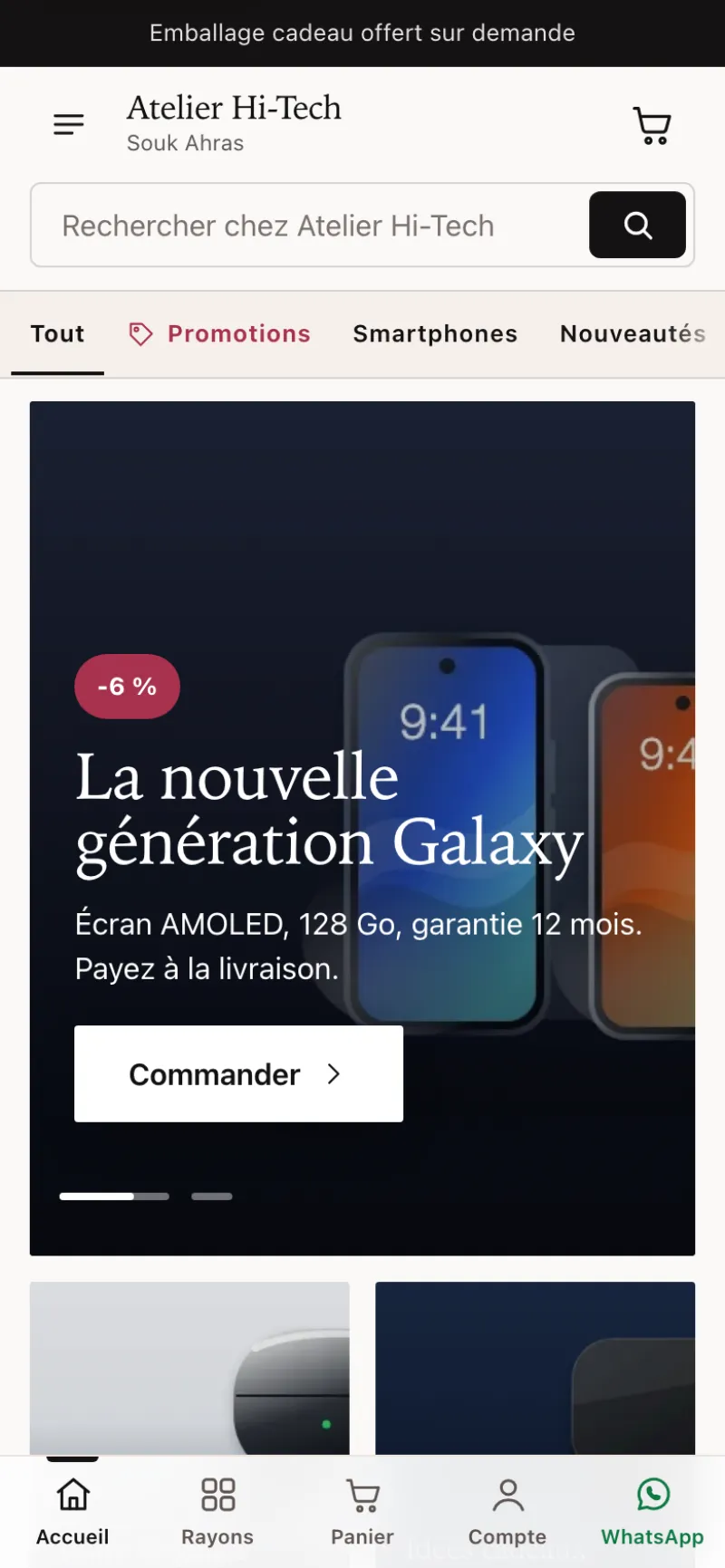
Shop home page with the Atelier theme on a phone: white, black and powder pink, promo slider

Slider and flash sale, no fake urgency.

Up to six slides with image, title, button and promo badge. The flash sale shows a countdown only when you give a real end date; afterwards the slide and the sale disappear from the site.

  • Slides linked to a department, a product or a page
  • Struck-through price taken from the till’s promotion
  • With no slides, the site shows your promotions by itself
  • Customer reviews: real reviews only, no invented stars
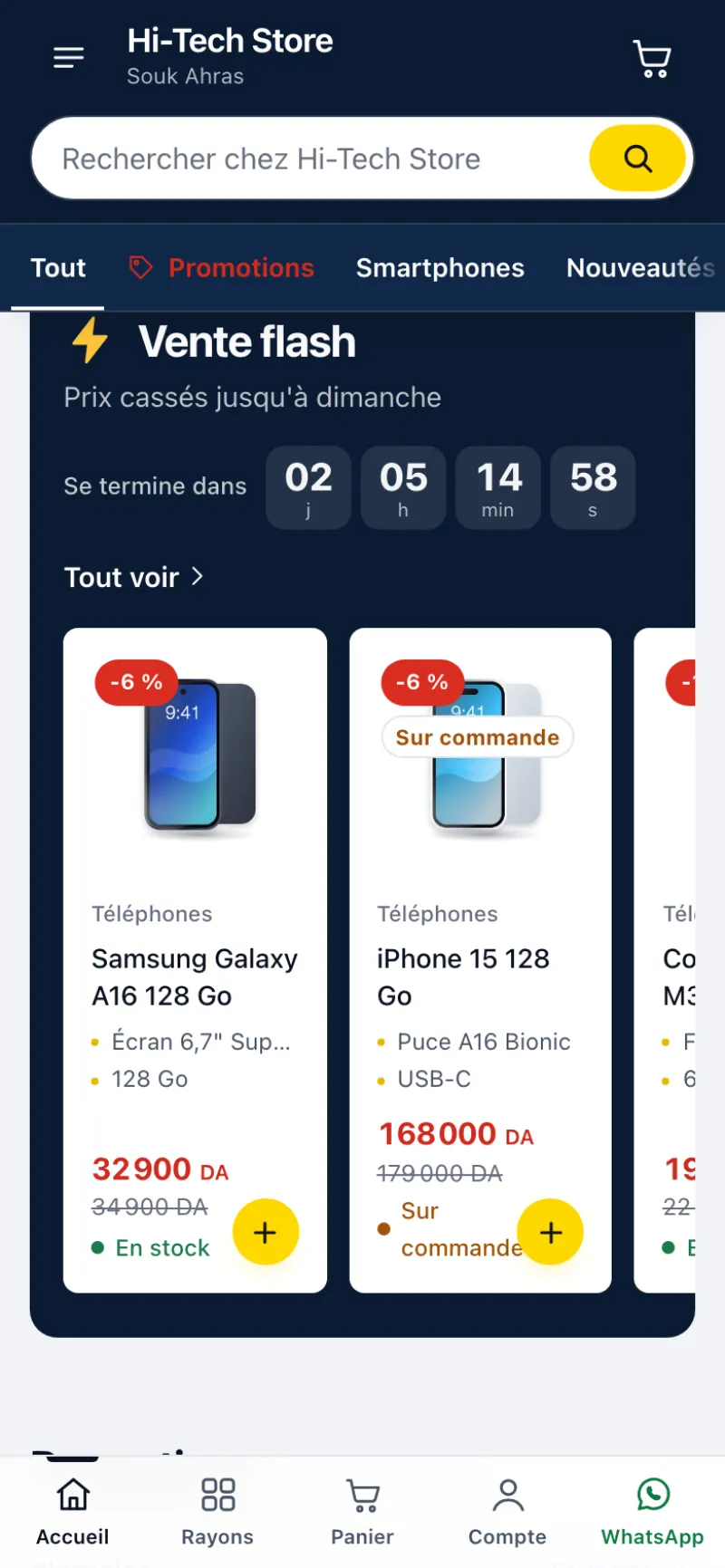
Flash sale on the shop: countdown to the end date, struck-through prices and availability

Customer accounts and order tracking.

Customers can create an account with their phone number and a password. Their name, addresses and orders are encrypted on their phone: LilouSoft cannot read them. Ordering without an account is always possible.

  • “My orders”: the status of each order, even without an account
  • Encrypted status sent by the till at each step, with the parcel number
  • Forgotten password: the customer writes to the shop, the till resets the account
  • Accounts on or off, as the shop chooses
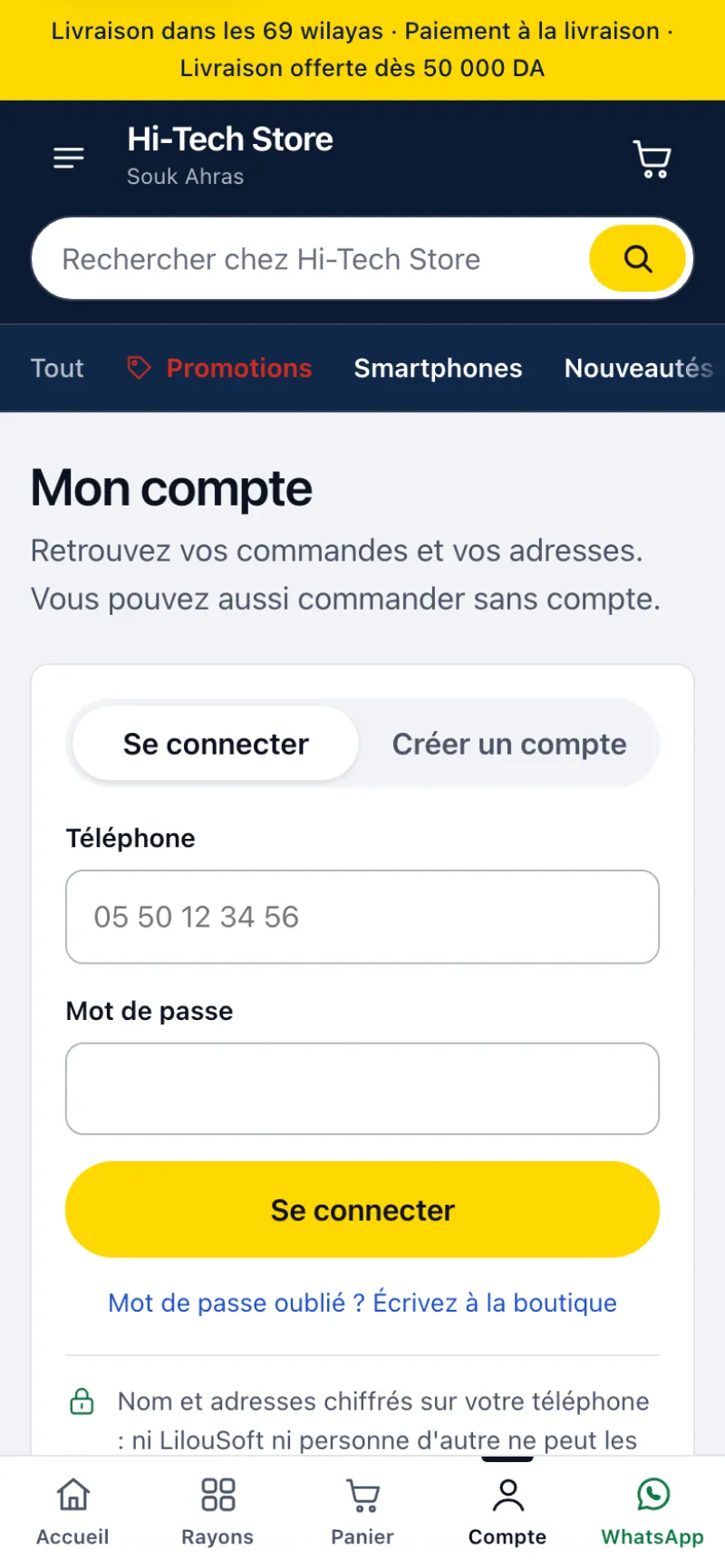
My account page of the shop: sign-in with phone number and password, ordering without an account still possible

Orders come in through all your channels.

On top of WhatsApp, customers can order through Messenger, Instagram or TikTok: the site copies the order summary, they just paste it. An order taken by phone or by message is entered at the till, like an order from the site.

  • Online orders › New manual order
  • Channel recorded: site, Facebook, Messenger, Instagram, TikTok, WhatsApp, phone, counter
  • Delivery to all 69 wilayas, indicative rates by zone
  • Free delivery from the amount you set

Screenshots of the site with a demo shop: products, prices and offers are fictitious.

One order, from storefront to parcel.

Everything happens in Kassa DZ POS, on the shop’s main till. There is no second software and no second stock.

  1. You publish

    Tick “Online” on a product card or a whole category. Price, photo and availability come from the till.

  2. The customer orders

    On the storefront, from their phone: cart, wilaya, commune, home or stop-desk. Or straight on WhatsApp.

  3. You confirm by phone

    The order lands in “Online orders”. You call the customer; confirming reserves the stock.

  4. You ship

    The till compares your couriers for the customer’s commune, creates the parcel and prints the label.

  5. The money comes in

    Parcel delivered: the sale is recorded. The courier’s payout is reconciled and any gap is shown.

A storefront that follows the till.

Nothing to copy by hand: the storefront shows what the till already knows. A price changes, a photo is redone, an item sells at the counter: the storefront updates itself 30 seconds later.

  • Clean Photo studio pictures, made on the PC, offline
  • In stock: “Available”. Zero stock but orderable: “On order”. Otherwise the item is hidden. Quantities are never shown
  • Struck-through price for promotions, items sorted by category
  • WhatsApp button on every product and the address lilousoft.com/boutique/your-name
  • A4 QR poster printed by the till, for the counter
  • RC and NIF at the bottom of the storefront if you wish (law 18-05)

Orders reach the counter, encrypted.

The order is encrypted on the customer’s phone with your till’s key. LilouSoft relays it without being able to read it, and deletes it as soon as the till has received it. The till checks for new orders every minute.

  • “To do” queue: you call the customer, then “Confirm” or “Cancel” with a reason
  • Confirming reserves the stock; nothing is sold before delivery
  • Flagged before the call: same number seen in the last 30 days, cash-on-delivery ceiling exceeded, not enough stock
  • The price seen online is compared with the till price: the till prevails
  • A ready WhatsApp message to ask the customer for the address

Your couriers, compared for every parcel.

Add the companies you have a contract with. When shipping, the till works out the real cost for the customer’s commune: delivery fee, cash-on-delivery commission and return risk, based on your own parcels. It suggests the best choice; you stay in control.

  • Home or stop-desk, with the courier’s exact list of communes and offices
  • Courier PDF label, or a slip printed by the till
  • Automatic parcel and status tracking
  • Wilayas 59 to 69 sent under the parent wilaya code; the customer’s commune stays as written
  • Credentials encrypted on the till, never sent to LilouSoft

Couriers supported by the till

Yalidine and its platform
Yalidine, Guepex, Yalitec, Easy & Speed, Economiqua, We Can Services
Companies on EcoTrack
DHD, Anderson, World Express, Conexlog, MSM Go, Rocket and more than 70 other companies
ZR Express
New platform, pickup points
Procolis platform
Former ZR Express, Abex, Leopard Express, Colilog, Flash Delivery
NOEST Express
Stations, automatic parcel validation
Maystro Delivery
Communes and delivery slip
Your own delivery
Your driver: wilayas served, flat rate, statuses entered by hand

You need a merchant account with each courier. Names are listed to show compatibility; LilouSoft is not affiliated with any of these companies.

Cash on delivery, reconciled to the dinar.

When the parcel is delivered, the sale goes into the till and the tax journal, just like at the counter. The amount due from the courier is computed: items, minus the fees you pay and the commission. When the money arrives, you tick “Payout received” and the gap is shown.

  • Due from couriers, received, gap: on one screen
  • Return received: each phone’s IMEI is scanned before it goes back into stock
  • IMEI different from the one shipped: the phone is blocked and the owner is alerted

What to know before you start.

The online shop is new. Here is, plainly, what it does and what it does not do yet.

Payment
Today the customer pays on delivery (cash on delivery). Online payment is coming soon.
Storefront address
The storefront is published at lilousoft.com/boutique/your-name, as a pilot.
Your obligations (law 18-05)
Selling online requires the trader to hold a trade register entry with the e-commerce activity and to be listed in the CNRC e-supplier file. The law also provides for a .com.dz domain name hosted in Algeria. These steps belong to the trader: check your case with the CNRC or your accountant.
Your couriers
The contract, rates, commission and payout times are the ones you negotiate with each company.
The main till
Orders arrive on the main till, which must be on and connected to receive them. Until then they wait safely, encrypted.

An option, added to your licence.

The online shop is added to your Kassa DZ POS plan. LilouSoft activates it on your licence, then you check it in Settings. Nothing is sent until the option is active.

  • Storefront, encrypted orders and shipping
  • Several couriers, compared at every shipment
  • Link to share and QR poster ready as soon as you publish

Your questions.

Do I need a website?

No. The storefront is created by the till and published by LilouSoft at lilousoft.com/boutique/your-name. You share the link on your social networks and put the QR poster on the counter.

Is the online stock the same as in the shop?

Yes. There is only one stock, the till’s. A confirmed order reserves the items; the sale is recorded on delivery.

Can LilouSoft see my orders?

No. Each order is encrypted on the customer’s phone with your till’s key. LilouSoft relays it without being able to read it and deletes it once the till has received it.

Which couriers can I use?

The ones you have a contract with: Yalidine and the companies on its platform, companies on EcoTrack, ZR Express, the Procolis platform, NOEST, Maystro, or your own driver. You can add several.

Can my customers pay online?

Not yet: payment is made on delivery. Online payment is coming soon.

What happens when a parcel comes back?

The till marks it “Return to check”. For a phone, you scan its IMEI: if it matches, the item goes back into stock. If not, it stays blocked and the owner is alerted.

Do my customers need to create an account?

No. The account is optional: customers can always order without one and follow their order in “My orders”. If they create an account with their phone number and a password, their name, addresses and orders are encrypted on their phone.

Can my customers order on Messenger, Instagram or TikTok?

Yes, since version 1.13. The site copies the order summary and the customer pastes it into the message. An order taken by message or by phone is entered at the till with “New manual order”.

How much does the option cost?

The price is set on quote, together with your Kassa DZ POS plan. Ask on WhatsApp or during the demo.

No-commitment trial.

Download the 14-day free trial, or request a demo on your type of shop. You decide afterwards, owing nothing.

or call 0560 11 80 52

Or leave your number: we call you back.

Your details are only used to get back to you. They are never sold or shared.